Use cases

Every way teams put agent runs to work.

AI coding, desktop, and browser agents do real engineering work—and leave blind spots when all you have is a chat log or a diff. Explore 61 workflows teams run on 23step and its 11 AI session plugins to eliminate repeat errors, control AI spend, synthesize pre-merge reviews and E2E tests, maintain living wikis, and satisfy security and compliance audits.

  1. 01 Under 400 tokens Compact MCP run and plugin summaries let follow-up agents inspect outcomes and open tasks before opening details.
  2. 02 10+ AI agents Coding agents, desktop overlays, Linux VMs, and headless browsers report to one timeline while live comments steer active runs.
  3. 03 11 AI session plugins Turn completed sessions into pre-merge Catch reviews, OWASP and SOC 2 audits, E2E specs, walkthroughs, wikis, changelogs, and tech radar.
  4. 04 Configurable redaction Secrets are always scrubbed before storage, PII redaction is configurable per org, and every MCP read is audited.

By role

Start from what your team owns.

One run record serves individual contributors, engineering leaders, security reviewers, and QA automation teams without adding process overhead.

Developers

Ship faster without babysitting terminals or repeating context.

Attach one step link to your pull request, run a two-minute Catch merge review, DebtRadar shortcut check, or SchemaWatch contract review, watch parallel agents from a desktop dock, and resolve open plugin tasks over MCP.

  • Triage large AI pull requests in minutes with Catch merge verdicts, DebtRadar cleanliness scores, and SchemaWatch checks
  • Turn recurring command failures and retry loops into copy-ready AGENTS.md rules with Stride
  • Hand recorded steps and ready-made plugin fix prompts to Claude, Cursor, Codex, or Gemini over MCP
  • Resume interrupted or timed-out sessions from the exact step where work stopped
Plugin & developer workflows

Engineering & FinOps leads

See where AI budget goes and raise first-pass completion rates.

Break down usage, cache hit rates, runtime, and error rates by organization, team, squad, agent, and model—while automating Lore wikis, ShipLog changelogs, and TechRadar stack tracking from your plan's shared monthly AI credits.

  • Spot repeat tool errors, file churn, and runaway subagent loops driving unnecessary spend
  • Keep a step-cited wiki, release notes, and live 5-ring technology sonar current with Lore, ShipLog, and TechRadar
  • Enable every live 1st-party plugin in 1 click using shared monthly AI credits (Free 20 · Pro 150 · Team 600) with zero per-plugin fees
  • Export clean CSV usage and outcome reports for finance and leadership reviews

Cost & team workflows

Security & compliance

Keep an ordered, privacy-safe audit record of autonomous actions.

Know which prompt started a run, which commands executed, what appeared on screen, and who read the record—backed by Aegis OWASP security scans, Attest SOC 2 and GDPR packages, and always-on secret scrubbing.

  • Score completed sessions from 0 to 100 against OWASP ASVS, ISO 27001, SOC 2 Type II, and GDPR with Aegis and Attest
  • Always scrub credentials before storage, configure org PII redaction, and bake pixel PII masking onto shared plugin proof
  • Log every run and plugin MCP read with least-privilege scopes, caller, API key, tool name, and byte count
  • Scope visibility across private, squad, team, org, or public with automated retention

Security & audit workflows

QA & agent builders

Replay browser and computer-use runs visually and prove work to users.

Record Playwright, Puppeteer, headless Chrome, and Linux VM computer-use agents automatically, synthesize E2E suites with TestForge and walkthroughs with GuideCraft, and publish custom plugins on the 23step data stream.

  • Convert recorded browser checks and bug-fix sessions into runnable Playwright, Cypress, and unit tests with TestForge
  • Turn verified UI flows into annotated product walkthroughs and help guides with GuideCraft
  • See the page URL, DOM text, and visual state at every action when a selector misses
  • Connect custom OTLP agents and build commercial or internal plugins on the 23step data stream

Browser & platform workflows

Lead workflow — Continuous improvement

Stop paying for the same mistake twice.

AI coding agents hit the same dead ends across a team: the wrong test runner flag, a missing environment variable, or an ambiguous repository convention. 23step captures every non-zero exit code, tool error, and retry so one upstream fix makes every future run faster and cheaper.

  1. 01

    Spot repeat failures across the team

    The usage dashboard surfaces failed runs, failed shell commands, and per-tool error rates broken down by team, agent, and model.

  2. 02

    Jump straight to what broke

    Search across runs for the error text, or let an agent call get_run_summary over MCP to jump directly to failed steps without reading the whole transcript.

  3. 03

    Fix it once upstream

    Run Stride to generate copy-ready AGENTS.md rules from session friction—or point an agent at failed runs and open plugin tasks over MCP to draft the fix.

Try the self-improving loop with your agent

Once 23step MCP is connected, paste this prompt into Claude Code, Cursor, Codex, or Gemini CLI.

Use 23step MCP to list our failed runs from the past 7 days, inspect the failing steps for recurring command or tool errors, and propose an update to AGENTS.md so future runs avoid them.

Complete directory

61 workflows across 9 categories.

Filter by category or search by workflow, plugin, tool, or capability. Every workflow below runs on 23step today.

Showing all 61 workflows

01 — Continuous improvement

Make future AI runs faster, sharper, and cheaper.

Turn failed commands, retries, and cache misses into permanent improvements to your prompts, repository instructions, and model routing.

Find recurring errors and fix them once

Every failed command, non-zero exit code, and tool error is recorded in order. Fix the prompt, AGENTS.md, or repo tooling once so future runs stop paying to hit the same wall.

Built on: Command exit codes, tool error rates, full-text log search

Set up repo hooks

Let an agent fix its own past mistakes over MCP

Point Claude Code, Cursor, or Gemini at recent failed runs over MCP. It filters for runs with errors, inspects only the failing steps, spots the pattern, and proposes the instruction or config change.

Built on: MCP get_run_summary (has_errors, failed_moments), inspect_step, search_run_logs

MCP read tools

Turn setup stumbles into repository rules

Search team runs for the environment check, database seed, or lint flag agents always guess wrong, then codify the exact command in AGENTS.md or CLAUDE.md.

Built on: Cross-run search over shell commands, thoughts, and tool results

Trim wasted subagent fan-out and retry loops

Spot runs that spawn unnecessary subagents, repeat failed commands, or spin on stale assumptions, and tighten the skill or prompt behind them.

Built on: Dependency graph, command durations, per-run error counts

Match frontier models to the work that needs them

Compare completion rates, runtime, and error rates across models and agents so routine edits run on fast models while architecture work stays on frontier reasoning.

Built on: Usage & outcome breakdown by model, agent, and engineer

Keep prompt-cache hit rates high

Inspect input, cached, and output usage on every run to catch prompt templates, dynamic system headers, or tool changes that quietly break cache reuse.

Built on: Per-run input, cached, and output usage tracking

Pass lean context that stays under budget

Run manifests stay under 400 tokens, terminal output is stripped of escape codes, file edits ship as unified diffs, and unchanged screens are deduplicated so follow-up agents read 40–60% less overhead.

Built on: Compact MCP serialization, unified diffs, perceptual screen deduplication

MCP architecture

02 — AI session plugins

Turn finished sessions into reviews, audits, tests, wikis, and changelogs.

Eleven official 23step plugins across review, QA, security, and delivery analyze completed sessions from the 23step data stream and produce structured deliverables with actionable tasks, ready-made fix prompts, and share-safe visual proof.

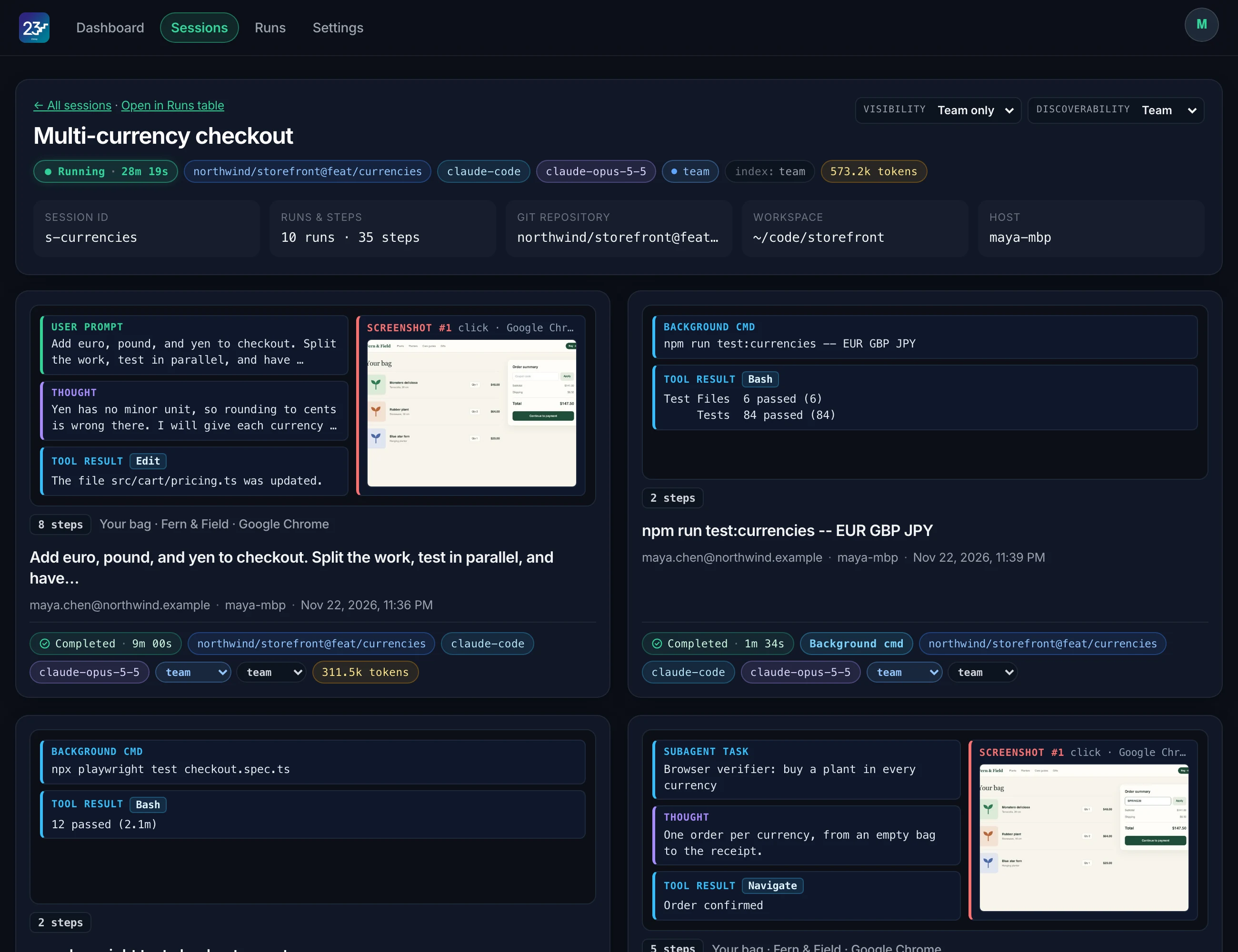
The session viewer: a multi-currency checkout session with its prompts, background commands, and subagents as cards.
Session view grouping every prompt, command, and subagent that feeds 23step session plugins.

Triage pull requests in two minutes with Catch

Answer what's the catch on any completed coding session with a calibrated 0–100 Review Score, merge verdict, must-read file diffs, risk checks, and visual proof.

Built on: Catch, 0–100 Review Score, merge verdicts, and copy-ready Markdown

Explore Catch

Eliminate retry loops and file churn with Stride

Score execution efficiency from 0 to 100, pinpoint where commands looped or repeatedly edited the same files, compare against the shortest path to green, and export copy-ready AGENTS.md rules.

Built on: Stride (included in every plan), 0–100 Efficiency Score, and AGENTS.md rule generator

Explore Stride

Catch silent agent sabotage and say-vs-do contradictions with Polygraph

Independently cross-check user constraints and assistant claims against recorded file diffs, ML hyperparameters, eval thresholds, and command exit codes to flag covert tampering, oscillating regressions, and false-green reports before trusting a session.

Built on: Polygraph (included in every plan), 0–100 Fidelity Score, 4-channel seismograph, and independent cross-model verification

Explore Polygraph

Maintain a living, step-cited engineering wiki with Lore

Keep repository architecture guides, service boundaries, and operational runbooks continuously synchronized as code ships—tracing every documented claim back to the session that built it.

Built on: Lore (included in every plan), living multi-page wiki, and step-cited provenance

Explore Lore

Map stack adoption and migrations live with TechRadar

Sweep languages, frameworks, packages, cloud infrastructure, and active migrations across sessions onto an interactive 5-ring Adopt, Trial, Assess, Hold, and Retire technology sonar.

Built on: TechRadar (included in every plan), interactive 5-ring sonar, and stack & migration discovery

Explore TechRadar

Resolve plugin findings directly from your IDE over Plugin MCP

Pull compact plugin summaries under 450 tokens across all 11 plugins, fetch ready-made remediation prompts for open tasks, post thread comments, and mark tasks done live from Claude Code, Cursor, or Codex.

Built on: Plugin MCP (/mcp/plugins), get_plugin_summary, inspect_plugin_doc, complete_plugin_task, and native MCP prompts

MCP reference

03 — Cost & FinOps

See what AI agents cost across every team, repo, and model.

Replace surprise monthly invoices with real-time attribution by organization, team, squad, and engineer—backed by run-level outcomes.

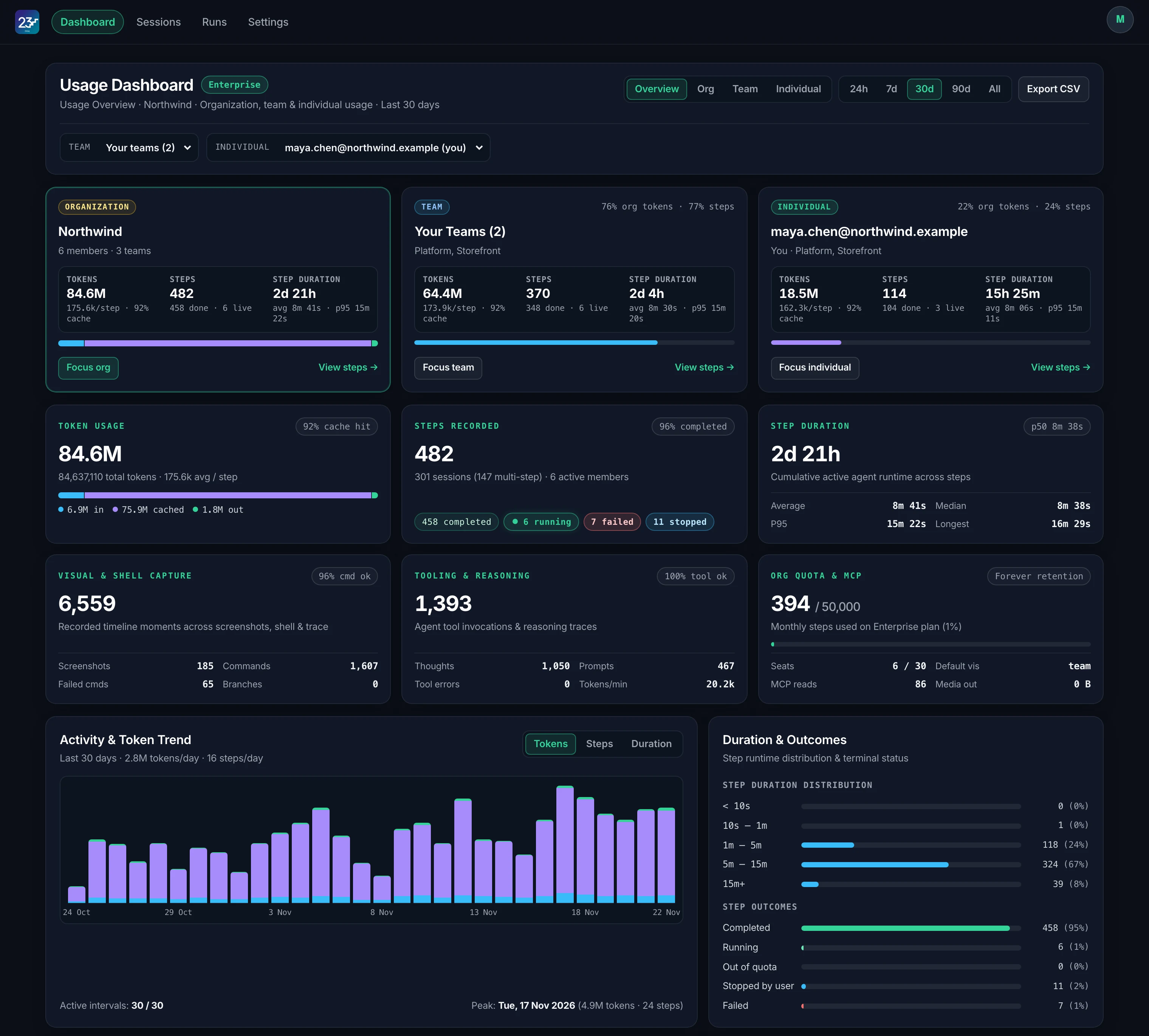
The usage dashboard: usage, runs, and time by organization, team, and person, with a 30-day trend chart.
Usage, cache reuse, runtime, and outcomes across organizations, teams, and engineers.

Export usage and outcomes to CSV for finance

Download clean CSV reports of usage, run counts, and outcomes for departmental chargebacks, budget forecasting, and executive reporting.

Built on: One-click dashboard CSV export

Evaluate coding agents on your own repositories

Run trials of Claude Code, Cursor, Codex, Antigravity, and Gemini CLI side by side and compare real completion rates, speed, and cost per merged change.

Built on: Multi-agent OTLP & hook telemetry

04 — Code review & verification

Review the reasoning and visual proof behind every AI diff.

A 1,500-line AI pull request is hard to trust from the diff alone. A step link shows what was asked, why the agent chose that approach, and proof that checks ran.

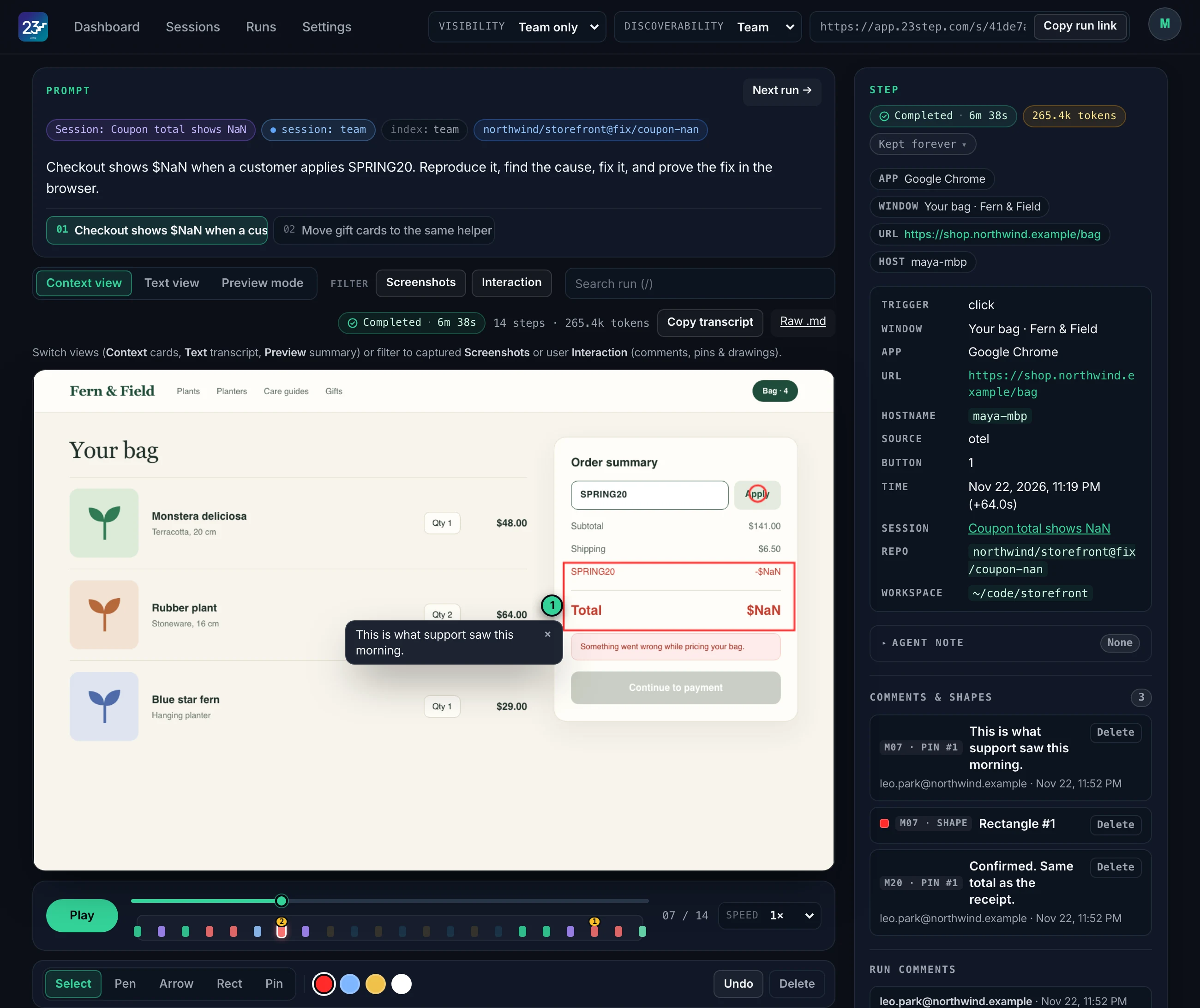
The 23step run viewer. A checkout page captured mid-run shows a total of $NaN, boxed in red with a teammate's comment, above a timeline of every step in the run.
Run viewer pairing the prompt, timeline, visual state, and pinned reviewer feedback.

Link agent reasoning directly to commits and PRs

Paste the step link into a commit message or pull request description so reviewers see the prompt, intermediate thoughts, and rejected alternatives alongside the diff.

Built on: Shareable step links with repository and git branch metadata

Verify "all tests pass" against recorded exit codes

Confirm whether the agent actually ran the full test suite or only a subset by checking ordered shell commands, durations, and exit codes.

Built on: Ordered command timeline with exit codes and runtime

Visual QA for frontend, responsive, and checkout changes

Inspect what was on screen at every action during local verification—catching broken totals, z-index bugs, or mobile overflow before code hits staging.

Built on: Ordered visual replay with click coordinates and page URLs

Draw on screens and pin notes in place

Sketch directly on a captured screen, drop a numbered pin on a UI element, or comment on a specific step so feedback points to the exact moment.

Built on: Frame drawing tools, coordinate pins, and step comments

Send clients and end users proof of what ran

Agencies, forward-deployed engineers, and AI product teams share public step links so customers see transparent proof of completed automated work.

Built on: Public share links (/s/<id>)

05 — Real-time control

Supervise parallel agents and course-correct them mid-run.

Run five agents at once without losing track of any of them—across local terminals, IDE panes, and remote cloud sandboxes.

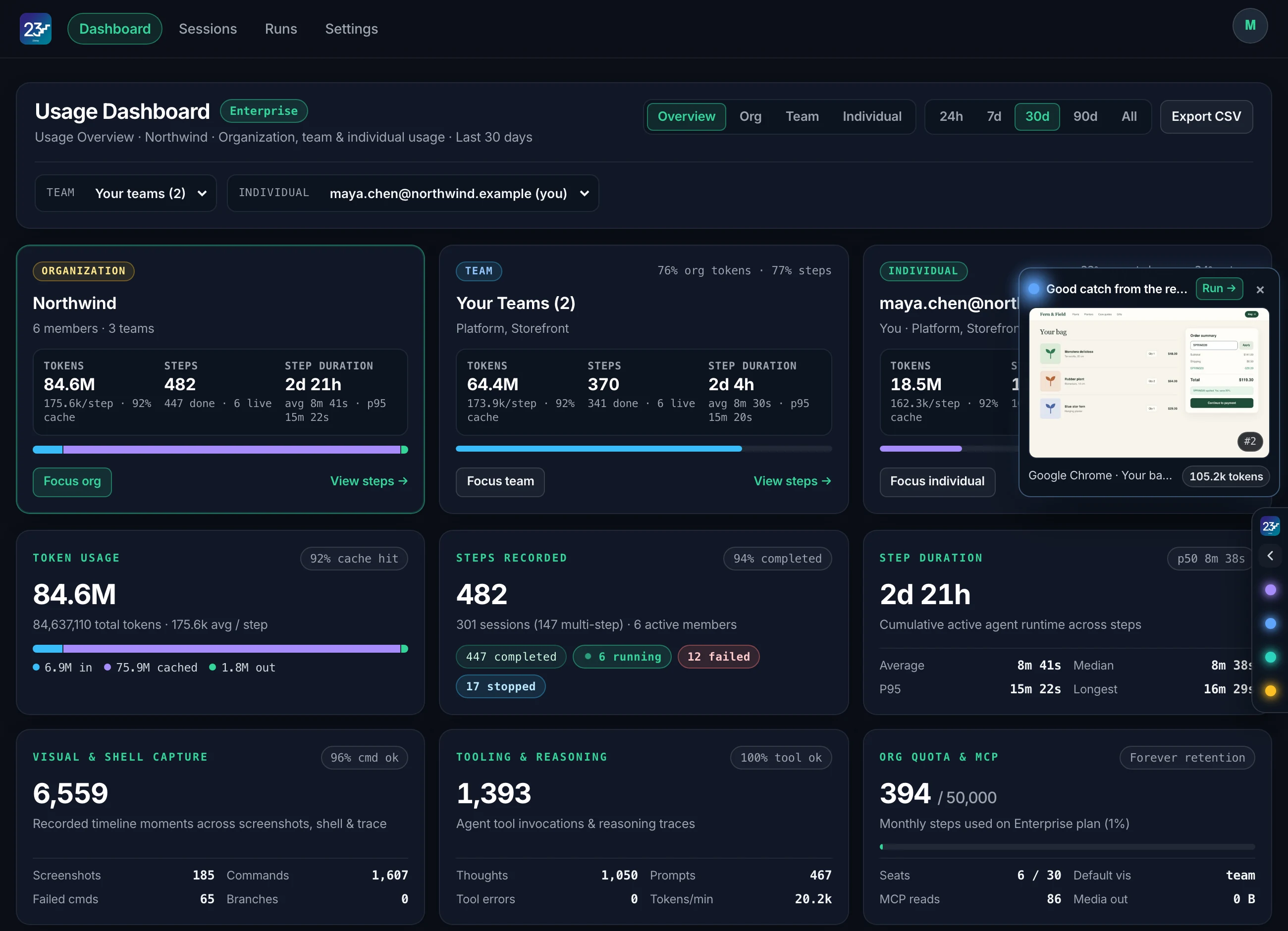
The live widget docked beside the dashboard, with a pop-up of the screen an agent has just captured.
Live dock showing active agent stages and a freshly captured screen beside the dashboard.

Steer a running agent mid-turn with a comment

Spot an agent heading down the wrong path? Comment on the live step or pin a note to a screen and the agent receives your feedback on its next tool boundary—no kill and restart.

Built on: Live feedback polling and PreToolUse / PreInvocation hook injection

See cloud VMs and local IDE agents side by side

Watch Cursor Cloud Agents, remote Linux workers, and CI runs right alongside local Claude Code, Cursor, or Antigravity sessions in one unified live list.

Built on: Live event stream + remote OTLP ingest

Stop polling terminals waiting for a run to finish

Subtle yellow start flashes, green completion pulses, and optional live screen previews notify you the instant an agent wraps up or stalls.

Built on: Configurable overlay stage animations and background subagent tab

Keep your squad's active runs in view

See what teammates' agents are editing right now to prevent conflicting refactors, and mute squad or team alerts with one toggle when you want heads-down focus.

Built on: Organization, team, and squad live scoping

06 — Collaboration & memory

Hand off live context across people, sessions, and AI tools.

Stop copying multi-megabyte terminal scrollback into Slack or starting fresh sessions from zero after a crash.

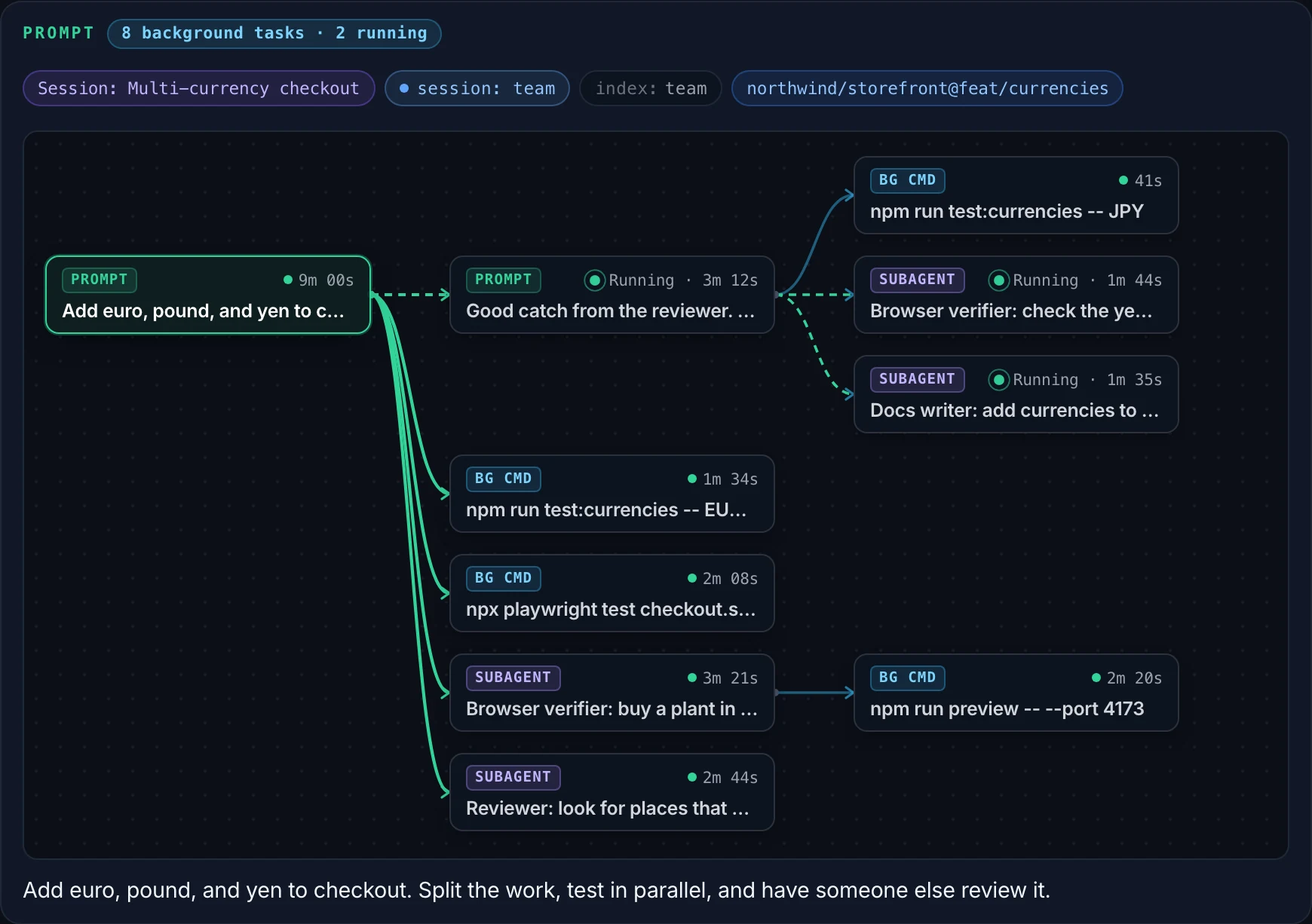
A dependency graph: one prompt branches into background commands, subagents, and a follow-up prompt with two tasks still running.
Dependency graph linking follow-up prompts, background commands, and subagents in one session.

Resume cleanly after a crash, timeout, or context reset

Runs stream incrementally and chain into sessions, so even if an agent crashes, hits a quota wall, or gets stopped, the next session sees the exact step where work halted.

Built on: Crash-safe incremental manifests, session_id, and previous_step chaining

File bug reports backed by full execution receipts

Capture the exact run where a staging flow, API call, or migration broke—complete with commands, logs, visited URLs, and screens—so engineers reproduce issues immediately.

Built on: Team, organization, and public step sharing

Answer "how did we solve this last month?" in seconds

Search across every teammate's shared runs by error message, CLI command, package name, or URL to reuse proven fixes and prompts.

Built on: Indexed full-text search across prompts, commands, logs, URLs, and notes

07 — Governance & privacy

Adopt autonomous coding agents with enterprise-grade guardrails.

Give security, risk, and compliance teams complete visibility into autonomous actions while keeping credentials and personal data out of storage.

Maintain an ordered audit trail for every agent run

Record the initiating prompt, host, git repository, branch, tool calls, shell commands, and visual states in strict sequence for internal governance and incident review.

Built on: Immutable step sequence and session grouping

Always scrub secrets, with configurable PII redaction

API keys, credentials, auth headers, and private keys are always redacted before storage, while PII redaction (such as email addresses across prompts, commands, transcripts, notes, and DOM text) is on by default and configurable per organization in Settings.

Built on: Pre-storage redaction pipeline with org-level PII toggle in Settings

Audit every MCP read across your organization

Every MCP query is checked against organization membership and step visibility, then written to an audit log with caller, key, tool, and response bytes—plus SSO and audit export on Enterprise.

Built on: MCP audit log, Enterprise SSO, and audit export

Compare plans

Enforce automatic retention windows by plan or run

Expire heavy visual media after 14, 30, or 90 days while keeping text, MCP, and wiki memory searchable for 30, 180, or 365 days—or set custom per-run and per-session windows to match internal data-handling policies.

Built on: Decoupled media and text retention purge with session-level controls

Isolate organizations, teams, and squads cleanly

Keep runs private by default, share selectively with a squad, team, or organization, and isolate tenant data with scoped API keys and row-level database security.

Built on: Scoped st_ API keys, 5-level visibility, and Postgres row-level security

08 — Visual & browser automation

See every click, URL, and visual state in browser and VM agents.

Text logs miss layout shifts, blocked modals, and mis-clicked coordinates. Visual capture pairs every browser or desktop action with the exact page state.

Debug flaky CI end-to-end tests and web scrapers

Inspect the exact visual state and DOM snapshot right before a Playwright assertion timed out or a scraper hit an unexpected layout change.

Built on: Action-triggered visual timeline with click markers and DOM text

09 — Platform & extensibility

Standardize every agent in your stack behind one open contract.

Engineers pick their favorite coding tools while platform teams get one consistent schema, OpenTelemetry ingest, and an extensible plugin marketplace.

FAQ

Common questions about 23step workflows.

01 How does 23step reduce AI coding agent spend?

23step attacks wasted AI spend from five angles: it flags failed commands and tool errors so you fix repeat dead ends once in AGENTS.md; Stride scores session directness to eliminate file churn and retry loops; it tracks input, cached, and output usage so you catch broken prompt caching; it benchmarks completion rates across models so routine work moves off expensive frontier models; and it passes compact (under 400 tokens) run summaries over MCP so follow-up agents never pay to rediscover the same codebase.

02 What are 23step session plugins, and how do teams use them?

Session plugins analyze completed sessions from the 23step data stream to produce structured engineering deliverables—included across every plan via shared monthly AI credits (Free 20, Pro 150, Team 600, Enterprise unlimited) with individual 1-click enable, free auto-Catch on your first 5 pushed or PR sessions, and zero per-plugin paywalls. Built by 23step across review and QA (Catch pre-merge reviews, DebtRadar shortcut guard, SchemaWatch API & SQL contract checks, Stride efficiency scoring, and TestForge Playwright/Cypress & unit suites), security and compliance (Aegis OWASP ASVS, SOC 2, GDPR & ISO 27001 security scans, Polygraph independent anti-sabotage and say-vs-do audits, plus Attest compliance attestations in the Enterprise Governance Suite), delivery and docs (ShipLog changelogs & upgrade notes, GuideCraft visual walkthroughs, Lore living engineering wiki, and TechRadar 5-ring technology sonar), plus free CR Badges. Coding agents can also inspect findings, pull ready-made fix prompts, comment, and mark tasks done over Plugin MCP, and external developers can build their own plugins on the 23step data stream.

03 Which AI coding, desktop, and browser agents work with 23step?

23step unifies all your harnesses simultaneously and seamlessly in one place—setup takes 5 minutes. It works out of the box with Claude Code, Cursor, Cursor Cloud Agents, Codex, Antigravity, Gemini CLI, Cline, and Grok Bot, plus Playwright, Puppeteer, headless Chrome, and Linux VM computer-use agents (Claude computer use, OpenAI computer use, E2B, Orgo, Browserbase). Any custom agent emitting OpenTelemetry (OTLP) traces or logs can also report directly.

04 How do engineering teams use 23step in pull request review?

Developers paste a step link—or let CR Badges automatically attach a replay link and live Catch verdict badge alongside DebtRadar and SchemaWatch checks—into the commit message or pull request description. Reviewers inspect the 0–100 Review Score, merge verdict, must-read file diffs, original prompt, intermediate reasoning, executed test commands with exit codes, and visual states from local browser checks, and can draw on screens or pin notes directly to specific moments.

05 How does 23step handle secret and PII redaction, and is it configurable?

Secrets—including API keys, credentials, auth headers, cookies, and private keys—are always redacted before anything reaches storage. PII redaction (scrubbing email addresses across prompts, shell commands, logs, session titles, notes, and DOM text) is enabled by default and configurable per organization in Settings, so admins can turn it off when team emails should stay visible. When Aegis, Attest, GuideCraft, or ShipLog reports are shared externally, irreversible pixel PII masking and EXIF stripping are applied automatically. Input listeners record only high-level categories (such as letter, digit, or enter) rather than typed characters, runs default to private visibility, and every MCP read is written to an audit log.

06 How does agent-to-agent context handoff work over MCP?

Connect any MCP client (Claude Desktop, Claude Code, Cursor, Antigravity, Codex, Gemini CLI, or Grok Bot) to https://mcp.23step.com/mcp—or point plugin-scoped keys at /mcp/plugins across all 11 plugins. When you share a step or plugin report, the next agent calls get_run_summary (under 400 tokens) or get_plugin_summary (under 450 tokens), pulls ready-made remediation prompts for open tasks, drills into specific logs or unified diffs only where needed, and marks plugin tasks resolved when finished.

07 Do we need to wrap an SDK or rewrite our prompts to use 23step?

No. Setup takes 5 minutes: for coding agents, a single hooks installer configures native lifecycle hooks in your repository or user home directory with zero prompt changes. Missed turns are reconciled automatically from local transcripts, and custom frameworks can point standard OpenTelemetry exporters at 23step.

Record your next agent run.

Install takes a few minutes, and the free tier is enough to try it on real work.

Build on steps

Integrations read a step to review it, explain it, or pass it to the next tool.

Browse the marketplace